
In an ideal online casino cashier workflow, mobile financial service (MFS) deposits credit automatically within 2 to 8 minutes through automated Transaction ID (TrxID) matching. However, on rare occasions, a player in Bangladesh may complete a transfer via bKash, Nagad, Rocket, or Upay, submit their TrxID in the Rajabaji cashier, and find that their gaming balance remains uncredited after 15 to 30 minutes. Encountering a missing or delayed deposit can cause anxiety, but understanding the underlying technical causes—such as typographical errors in alphanumeric TrxIDs, network SMS delivery delays, banking gateway latency, or transacting with rotated merchant numbers—allows for rapid resolution. This comprehensive operational manual outlines the exact technical troubleshooting steps, details how to extract verified proof of payment, provides the standard live support escalation script, and explains how the finance desk locates and credits stranded transactions.
Technical Specifications & Cashier Processing Architecture
Understanding how Rajabaji’s automated reconciliation gateway processes incoming MFS payments helps clarify why certain transactions require manual review:
| Processing Parameter | Specification | Strategic Implication for Players |
|---|---|---|
| Reconciliation Engine | Automated Alphanumeric TrxID Scraper | Matches incoming MFS statement records against player cashier tickets |
| Standard Turnaround Time | 2 to 8 Minutes | Automatic crediting once sender, amount, and TrxID match |
| Manual Escalation Window | After 15 Minutes | Threshold when players should submit a ticket to live support |
| Required Proof of Payment | MFS SMS Receipt / App Statement Screenshot | Must show TrxID, sender number, receiver number, date, and amount |
| Supported Operators | bKash, Nagad, DBBL Rocket, Upay | All licensed Bangladeshi MFS gateways covered by manual audit |
| Dispute Resolution SLA | 5 to 20 Minutes (Standard Review) | Maximum resolution time once complete verification proof is provided |
| Escalation Support Channel | 24/7 Real-Time Live Chat & WhatsApp VIP Desk | Direct access to dedicated cashier finance agents |
The Four Common Root Causes of Missing Deposits
When an automated deposit fails to reflect in your Rajabaji balance within 10 minutes, the issue almost always stems from one of four technical factors:
                                [ COMMON TRANSACTION DELAY CAUSES ]
                                                 │
             ┌───────────────────────────────────┼───────────────────────────────────┐
             ▼                                   ▼                                   ▼
    [ TYPOGRAPHICAL ERROR ]             [ NETWORK SMS DELAYS ]              [ STALE RECEIVER NUMBER ]
    • Confusing letter 'O' with '0'     • Telco network congestion delays   • Sending funds to an old merchant
    • Mistyping letters 'I' or 'l'        SMS receipt delivery                number saved from days prior
    • Missing the 12th digit (Rocket)   • TrxID submitted before bank sync  • Cashier cannot auto-match number
In-Depth Breakdown of Delay Factors:
- Alphanumeric Typos in the TrxID Field: Mobile banking Transaction IDs are 8 to 10 characters long, combining uppercase letters and numbers (e.g., `BKH89X0L21`). It is common for users typing quickly on small smartphone keyboards to confuse the capital letter "O" with the numeric digit "0", or the lowercase "l" with the uppercase "I" or number "1". When an incorrect TrxID is submitted, the automated gateway finds no match on the merchant bank statement and leaves the ticket in "Pending" status.
- Telco SMS Network Delays: During peak hours or severe weather events, cellular SMS gateways can experience delivery delays of 10 to 20 minutes. If a user tries to guess their TrxID or submits a ticket before the transfer is officially confirmed on the operator's central server, the automated query will fail.
- Sending to an Expired Receiver Number: To maintain operational security and manage regulatory liquidity limits, Rajabaji rotates its active merchant and agent deposit numbers periodically. If a player transfers funds to an old number saved in their personal phone contacts from the previous week, the automated cashier cannot auto-reconcile the deposit, requiring manual intervention.
- Amount Discrepancy: If you request a deposit of ৳2,000 BDT in the cashier, but accidentally transfer ৳1,950 BDT (forgetting network cashout fees), the system will flag the amount discrepancy and hold the ticket for manual review.
Step-by-Step Resolution: Extracting Verified Payment Proof
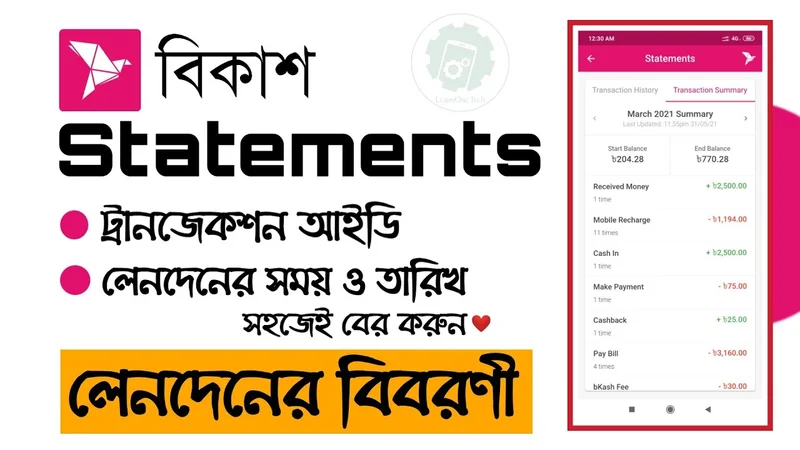
Before contacting live support, gather the necessary documentation so the finance desk can resolve your deposit without back-and-forth messaging:
[ PROOF PREPARATION CHECKLIST ]
                │
                ├──► 1. Open your mobile financial app (bKash / Nagad / Rocket)
                │
                ├──► 2. Navigate to "Statement" (স্টেটমেন্ট) or "Transaction History"
                │
                ├──► 3. Tap on the specific transfer to open the full digital receipt
                │
                └──► 4. Capture a clear, uncropped screenshot displaying all 5 required elements:
                         • Transaction ID (TrxID)
                         • Date and Time Stamp
                         • Sender Mobile Number
                         • Recipient Merchant / Agent Number
                         • Exact Amount Transferred
Live Support Escalation Protocol: What to Send
Once your payment proof screenshot is ready, initiate contact with Rajabaji’s 24/7 Live Support desk:
[ ESCALATION WORKFLOW ]
Open Live Chat on Rajabaji ──► Select Department: "Cashier / Deposit Issue"
                                     │
                                     ▼
Agent connects (< 60 seconds) ──► Send the Standard Escalation Script
                                     │
                                     ▼
Upload the uncropped payment screenshot into the chat window
                                     │
                                     ▼
Agent verifies TrxID on the merchant statement ──► Funds credited within 5-10 minutes!
Standard Live Support Escalation Template:
Copy and paste this structured template into the Rajabaji live chat window, filling in your specific details:
Hello Cashier Support Team,

My deposit has not been credited after 20 minutes. Please assist with manual verification.

• Rajabaji Username: [Your Username]
• Payment Channel: [bKash / Nagad / Rocket / Upay]
• Sender Account Number: [e.g., 017XXXXXXXX]
• Receiver Account Number: [e.g., 018XXXXXXXX]
• Exact Amount: [e.g., ৳2,500 BDT]
• Transaction ID (TrxID): [e.g., BK987X4520]
• Date & Time: [e.g., 20-Sept-2026 at 14:15 BST]

I have attached the complete, uncropped transaction receipt screenshot above. Thank you!
Providing this complete data package upfront enables the support agent to bypass preliminary questioning, locate the transaction directly in the merchant statement, and credit your balance immediately.
How the Finance Desk Investigates Delayed Transfers
When your escalation ticket is submitted, the Rajabaji finance desk follows a standardized internal verification process:
                                [ FINANCE DESK AUDIT PROCESS ]
                                               │
             ┌─────────────────────────────────┼─────────────────────────────────┐
             ▼                                 ▼                                 ▼
    [ LOG QUERY ]                     [ DISCREPANCY AUDIT ]             [ MANUAL OVERRIDE ]
    • Searches TrxID in backend       • If TrxID not found, queries     • Upon confirming fund receipt,
      merchant MFS statements           by amount + sender number         agent executes manual credit
    • Confirms incoming BDT credit    • Corrects typographical errors     • Balance updates instantly
Even if you made a typographical error when submitting the TrxID in the cashier, the support team can search the merchant statement using your Sender Mobile Number and the Exact Transfer Amount, locate the transfer, and credit your balance.
Essential Precautions to Prevent Future Deposit Delays
To ensure all future deposits process smoothly through the automated matching engine:
- Always Copy-Paste the TrxID: Never type the TrxID manually. Tap and hold the TrxID in your bKash or Nagad app to copy it directly to your device clipboard, then paste it directly into the Rajabaji cashier field.
- Copy Fresh Receiver Numbers Each Time: Always check the cashier screen for the active deposit number before sending funds; never save numbers in your phonebook.
- Match Requested and Sent Amounts Exactly: Ensure the amount entered in the cashier matches the exact sum transferred, down to the Taka.
Responsible Gaming Safeguards
Experiencing a temporary payment delay can cause frustration, but it is important to remain patient and calm:
- Set a clear personal budget for gaming sessions and avoid making hasty duplicate deposits while waiting for a pending transfer to clear.
- Keep your gaming funds strictly separate from essential household and living finances.
- Treat online casino entertainment as a paid recreational activity, never as a financial investment.
- If you find yourself feeling stressed about gaming expenditures, seek free, confidential help from Gambling Therapy or GamCare, and utilize Rajabaji's responsible gaming deposit limits.
Related Guides & Cashier Walkthroughs
- Avoiding Personal MFS Account Freezes
- Bangladesh MFS Daily & Monthly Limits Guide
- Rocket DBBL Deposit & Cashout Guide
- Upay Casino Banking & Processing Guide
- bKash Deposit & Cashout Complete Guide
- Nagad Withdrawal Verification Process
- USDT Crypto Casino Funding Guide
- Official Account Registration & KYC Setup
- Regulated under licensing standards by Gaming Control Curacao and Curacao eGaming. Fast local cashier deposits supported by bKash, Nagad, and Rocket. Player welfare assistance accessible via Gambling Therapy and GamCare.
Ready to Experience Verified Gameplay?
Join thousands of Bangladeshi players on Rajabaji. Instant deposits via bKash, Nagad & Rocket, 100% welcome match up to ৳18,000, and certified fast payouts.
Claim ৳18,000 Welcome Bonus Now ⚡Frequently Asked Questions
If your deposit has not appeared in your balance after 15 minutes, check that your TrxID was entered correctly. If everything looks accurate, reach out to Rajabaji 24/7 Live Chat with your transaction receipt screenshot.
Do not submit multiple duplicate deposit requests. Contact live support immediately, provide your username and the correct TrxID along with a screenshot of your transfer receipt, and the agent will manually locate the transaction.
No. Rajabaji retains full access to its historical merchant and agent SIMs. If you transferred funds to a previously assigned number, the finance desk can verify the incoming statement on that specific SIM and credit your balance manually.
Automated matching fails if there is a single typo in the alphanumeric string (such as confusing the letter "O" with the number "0"), if the sender number does not match your registered profile, or if the transfer amount differs from the cashier ticket.
Your screenshot must be clear and uncropped, showing: (1) the Transaction ID (TrxID), (2) the sender account number, (3) the recipient number, (4) the exact amount transferred, and (5) the date and timestamp.
Yes. If network delays prevent your SMS receipt from arriving, open your bKash, Nagad, or Rocket app, navigate to the "Statement" or "History" tab, capture a screenshot of the completed transfer from inside the app, and share it with live support.